Every time I am trying to write an .iso to a usb drive and make it UEFI bootable, I get an error message, saying that the .iso file was not found. See the attached image. I would appreciate any help.
Every time I am trying to write an .iso to a usb drive and make it UEFI bootable, I get an error message, saying that the .iso file was not found. See the attached image. I would appreciate any help.
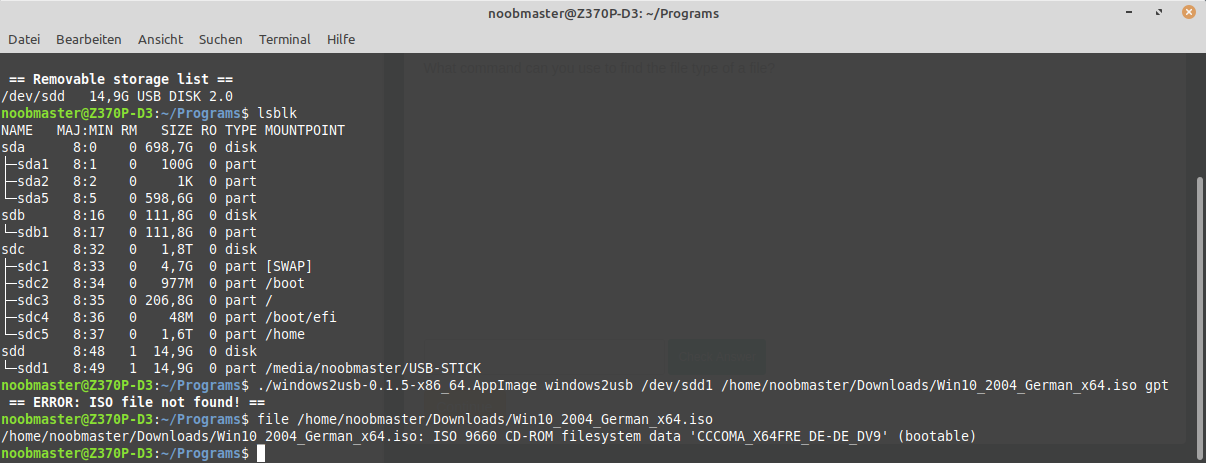
My issue was that the syntax for the command I formed was a bit wrong.
Below I have pasted the correctly working command, but I haven't used it
for a long time. It's just that you have to use the full path of the
AppImage, and ignore the "windows2usb" that you can find in their readme. I
am really just a beginner when it comes to using terminal commands, so I'm
not sure if you are having the same problem.
My issue was that the syntax for the command I formed was a bit wrong.
Below I have pasted the correctly working command, but I haven't used it
for a long time. It's just that you have to use the full path of the
AppImage, and ignore the "windows2usb" that you can find in their readme. I
am really just a beginner when it comes to using terminal commands, so I'm
not sure if you are having the same problem.
>
> /windows2usb-0.1.5-x86_64.AppImage /dev/sdd1
> /home/noobmaster/Downloads/manjaro-gnome-20.0.3-200606-linux56.iso --force
> gptntfs
>
On Mon, 21 Jun 2021 at 00:46, Matheus Moreira ***@***.***>
wrote:
> Did you close it because you figured it out?
>
> Yes, I just don't know how to delete this.
>
> Can you tell how you solved it? Having the same problem here...
>
> —
> You are receiving this because you modified the open/close state.
> Reply to this email directly, view it on GitHub
> <https://github.com/ValdikSS/windows2usb/issues/15#issuecomment-864615887>,
> or unsubscribe
> <https://github.com/notifications/unsubscribe-auth/AOHIQCCWKHGHQDYDZOLQAF3TTZOUFANCNFSM4PTTWN2A>
> .
>
Blocking a user prevents them from interacting with repositories, such as opening or commenting on pull requests or issues. Learn more about blocking a user.

Every time I am trying to write an .iso to a usb drive and make it UEFI bootable, I get an error message, saying that the .iso file was not found. See the attached image. I would appreciate any help.

Did you close it because you figured it out?
Yes, I just don't know how to delete this.
My issue was that the syntax for the command I formed was a bit wrong.
Below I have pasted the correctly working command, but I haven't used it
for a long time. It's just that you have to use the full path of the
AppImage, and ignore the "windows2usb" that you can find in their readme. I
am really just a beginner when it comes to using terminal commands, so I'm
not sure if you are having the same problem.
On Mon, 21 Jun 2021 at 00:46, Matheus Moreira @.***>
wrote: